
Integrations
Integrations overview
Supported, Beta, R&D, Planned, Legacy and Not in public build items are labelled per row.
An integration is any way that data or control crosses the boundary of neuromore Studio. Devices bring signals in: EEG headsets, heart rate belts, and any software that can send a number over the network. Studio sends feedback values out to a browser, a game engine, an audio tool or a custom application. The neuromore Engine, the C++ core inside Studio, can also be embedded in another program. Signal paths start or end in the classifier, see Nodes. The state machine adds control events.
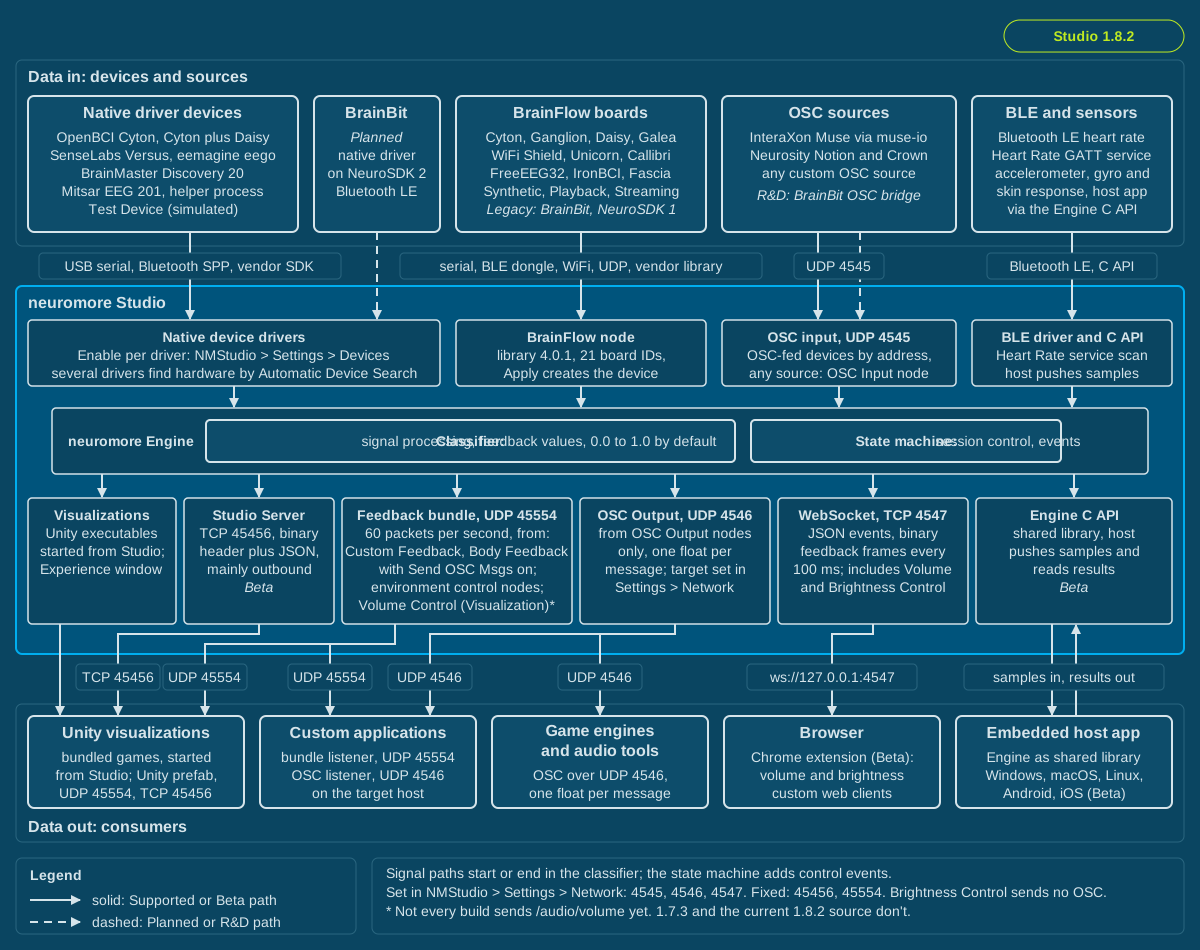
Top band: the main devices and sources for community builds, including planned paths. Middle: the four input paths, the Engine, and six output interfaces. Bottom: what consumes the results. Dashed lines are planned or R&D paths.
This page maps the landscape. Devices and BrainFlow boards hold the details. Browser neurofeedback with any device starts at Browser neurofeedback. The BrainBit pages, starting at BrainBit browser neurofeedback (R&D), are one worked example.
In 1.7.3: The device list, ports and protocols on this page are the same. Only the Engine CLI differs: it does not exist in 1.7.3.
How data gets into neuromore Studio
Section titled “How data gets into neuromore Studio”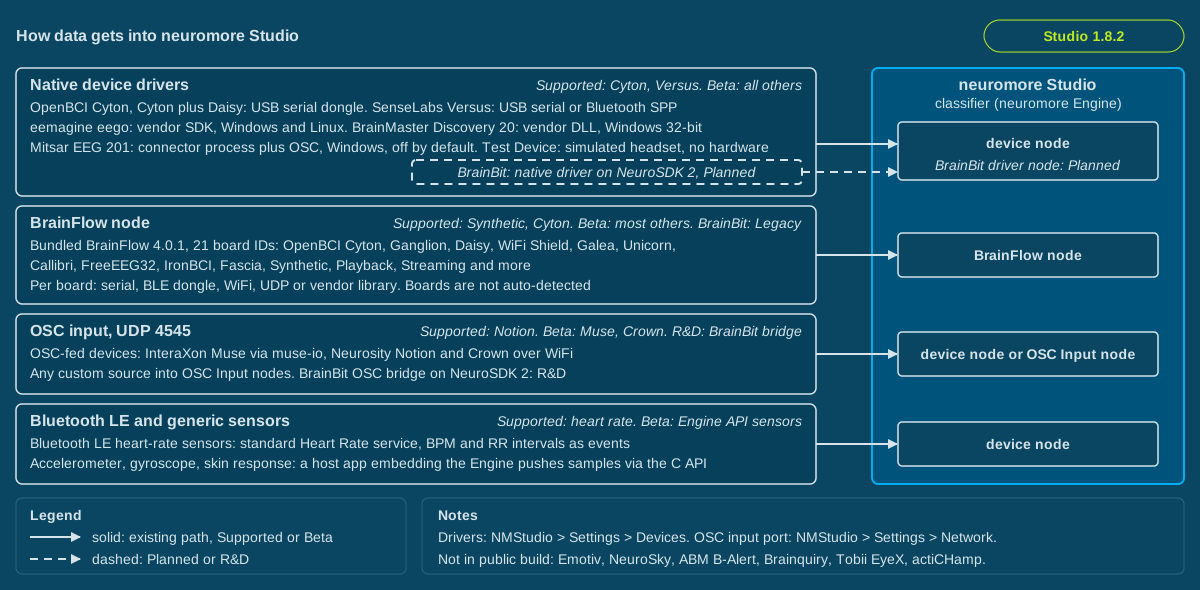
Each lane is one input path and ends in the node you see in the classifier. Devices on the OSC lane get their own device node. Any other OSC source uses an OSC Input node.
Native device drivers
Section titled “Native device drivers”Studio contains one driver per vendor. Turn each one on or off under NMStudio > Settings > Devices > Drivers, as “Enable [driver name]”. A change there may not reach a device search that is already running. A driver may read a serial port directly, as the OpenBCI and Versus drivers do, load a vendor library at runtime, as the eemagine and BrainMaster drivers do, or start a helper process, as the Mitsar driver does.
When Automatic Device Search is on, which is the default, several drivers poll for hardware at a fixed interval, from one to five seconds, and create the device automatically. The switch is at NMStudio > Settings > Devices > Automatic Device Search. The Test Device driver adds a simulated headset when no real device is connected. Engine configuration flags decide per platform which drivers are compiled in.
BrainFlow node
Section titled “BrainFlow node”Studio bundles BrainFlow 4.0.1 as a static library behind two classifier nodes, “BrainFlow” and “Cyton”. The BrainFlow node offers a dropdown of 21 board IDs plus connection parameters. Boards are not auto-detected: a BrainFlow board comes only from a node. The BrainFlow node creates its device when you press its Apply button. The Cyton node opens the serial port as soon as it is added to a classifier. Studio reads only EEG channels, so EMG-only and ECG-only boards cannot deliver data.
The Devices window shows a Search button only when Automatic Device Search is off. Search calls every driver. For BrainFlow it does not scan for hardware. It removes the BrainFlow device with ID 0, whichever board that is, so it can disconnect a real board. If there is no such device, it adds a Synthetic device.
OSC input
Section titled “OSC input”Studio listens for Open Sound Control messages on UDP port 4545 by default. Change it at NMStudio > Settings > Network > OSC Server > Input UDP port. Some devices arrive as OSC streams. Studio creates them when a message matches a registered address pattern:
- InteraXon Muse, through the external muse-io program. muse-io is not in the repository or the packaging files. It came with the older Muse SDK, and earlier download links no longer work. Check the Muse developer page or ask Muse for access before you rely on this path. See Biosensors. On Windows, Tools > Start MuseIO starts it, and that entry appears only when
Muse\muse-io.exesits next to the Studio executable. On macOS and Linux, the same entry opens a file dialog to select the program, then shows a command to run in a terminal. - Neurosity Notion and Crown. Biosensors describes them as streaming OSC over WiFi once OSC is enabled in the Neurosity developer console. That part is vendor behaviour, and the code only shows the addresses Studio expects.
- Mitsar on Windows, through the vendor connector process. The Mitsar driver starts that process, and the driver is off by default, so no Mitsar data arrives until you enable it.
Any other source can feed an OSC Input node, see OSC Tutorial.
Bluetooth LE and generic sensors
Section titled “Bluetooth LE and generic sensors”A Bluetooth LE driver, disabled by default, scans for the standard Heart Rate service and delivers beats per minute and RR intervals as events. The Engine also defines generic accelerometer, gyroscope and skin response devices with no Studio driver. They exist for a host application that embeds the Engine and pushes samples through its C API, see Engine library and source builds. A Gamepad device and node are registered too, but no code that feeds them was found.
Device matrix
Section titled “Device matrix”These docs show what the neuromore system can do. Community builds on GitHub do not include every device driver. Developers can add those drivers in their own source build. Commercial clients can get the integration as part of their custom build. Each device is labelled, so check the label before you buy hardware. See Editions and licensing.
The table has one row per device model in community builds, plus one row for BrainFlow boards and one planned row. Where Biosensors documents fewer platforms than the code compiles, Status says so. Details are in Devices, BrainFlow boards and BrainBit connection and setup.
Availability also depends on your neuromore account. Without the permission for a device, Studio shows neither the device nor its node. BrainFlow is the exception: it is available to every account.
| Vendor | Model | Path and transport | Platforms | Status |
|---|---|---|---|---|
| neuromore | Test Device, 8 simulated channels | Native driver; synthesized, 128 Hz | all | Beta, enabled by default |
| OpenBCI | Cyton, 8 channels | Native driver; USB serial dongle, 250 Hz | all | Supported |
| OpenBCI | Cyton plus Daisy, 16 channels | Native driver; USB serial dongle, 125 Hz | all | Beta |
| InteraXon | Muse, documented for model MU-01; the code reads muse-io OSC and does not check the model | OSC-fed device; OSC from external muse-io, not in the repository, 220 Hz | all | Beta, needs muse-io |
| Neurosity | Notion 1, Notion 2 | OSC-fed device; OSC over WiFi per vendor, 250 Hz | all | Supported |
| Neurosity | Crown | OSC-fed device; OSC over WiFi per vendor, 256 Hz | all | Beta |
| SenseLabs | Versus, 5 channels | Native driver, off by default; serial over USB or Bluetooth SPP, 250 Hz | all | Supported, documented Windows |
| eemagine (ANT Neuro) | eego 8, 32 and 64 channel | Native driver, vendor SDK at runtime; transport not stated in the code, 512 Hz | Windows, Linux | Beta |
| Mitsar | EEG 201, 23 channels | Native driver, off by default, starts a connector process that sends OSC; MitsarConnector.exe not in the repository, 500 Hz | Windows | Beta, documented Windows |
| BrainMaster | Discovery 20 | Native driver; vendor DLL bmrcm.dll, not shipped, must be on the Windows DLL search path, for example next to the Studio executable; needs vendor credentials (Code Key, Serial Number, Pass Key) to connect; FTDI serial over USB, 256 Hz | Windows 32-bit only | Beta, documented Windows x86 |
| Generic | Bluetooth LE heart rate monitor | Bluetooth LE driver, off by default; Heart Rate GATT service | all | Supported |
| Mindfield, Generic | eSense Skin Response; Accelerometer, Gyroscope | Engine API only, no Studio driver; host pushes samples | all | Beta, Engine embedding only |
| Generic | Gamepad | Engine device plus Gamepad node, no driver | all | Beta, no data source found |
| Various | BrainFlow boards, about 20 | BrainFlow node; per board serial, BLE dongle, WiFi, UDP or vendor library | all, varies per board | Supported for Synthetic and Cyton; Beta for most others, including Cyton Daisy; BrainBit Legacy; five IDs cannot deliver data in Studio, see the boards page |
| BrainBit | Headband, BrainBit 2, Flex 4, Flex 8 | Planned native driver on NeuroSDK 2, interim OSC bridge; Bluetooth LE, 250 Hz | Windows x64 and macOS arm64 first, Linux later | Planned driver, R&D bridge. Today BrainBit works through the legacy board on Windows, see BrainFlow boards |
Platforms come from the compile flags. “all” includes macOS, but serial devices on a packaged macOS build may be blocked by the app sandbox. This affects OpenBCI, Versus and serial BrainFlow boards.
Not in the public build
Section titled “Not in the public build”These devices are part of what the system can do, but community builds do not include them. They do not work in a downloaded package.
- Emotiv EPOC, EPOC+, Insight: Not in public build. Available through a source build (community) or a custom build (commercial clients). The vendor SDK is not in the repository.
- NeuroSky MindWave: Not in public build. Available through a source build (community) or a custom build (commercial clients). The vendor SDK is not in the repository.
- Advanced Brain Monitoring B-Alert X10, X24: Not in public build. Available through a source build (community) or a custom build (commercial clients). Windows 32-bit; vendor headers not in the repository.
- Brainquiry PET 4.0: Not in public build. Available through a source build (community) or a custom build (commercial clients). Windows 32-bit; vendor headers not in the repository.
- Brain Products actiCHamp: Not in public build. Available through a source build (community) or a custom build (commercial clients). The source has only a driver skeleton with no data path, so a build must complete it.
- Tobii EyeX eye tracker: Not in public build. Available through a source build (community) or a custom build (commercial clients). The vendor SDK is not in the repository.
Audio input, microphone and audio output are not offered as device integrations. Driver source exists, but its compile flag is commented out.
Lab Streaming Layer has no code in the source, so no build includes it. Bridge LSL to OSC. A device BrainFlow supports can use the BrainFlow node instead.
How data gets out of neuromore Studio
Section titled “How data gets out of neuromore Studio”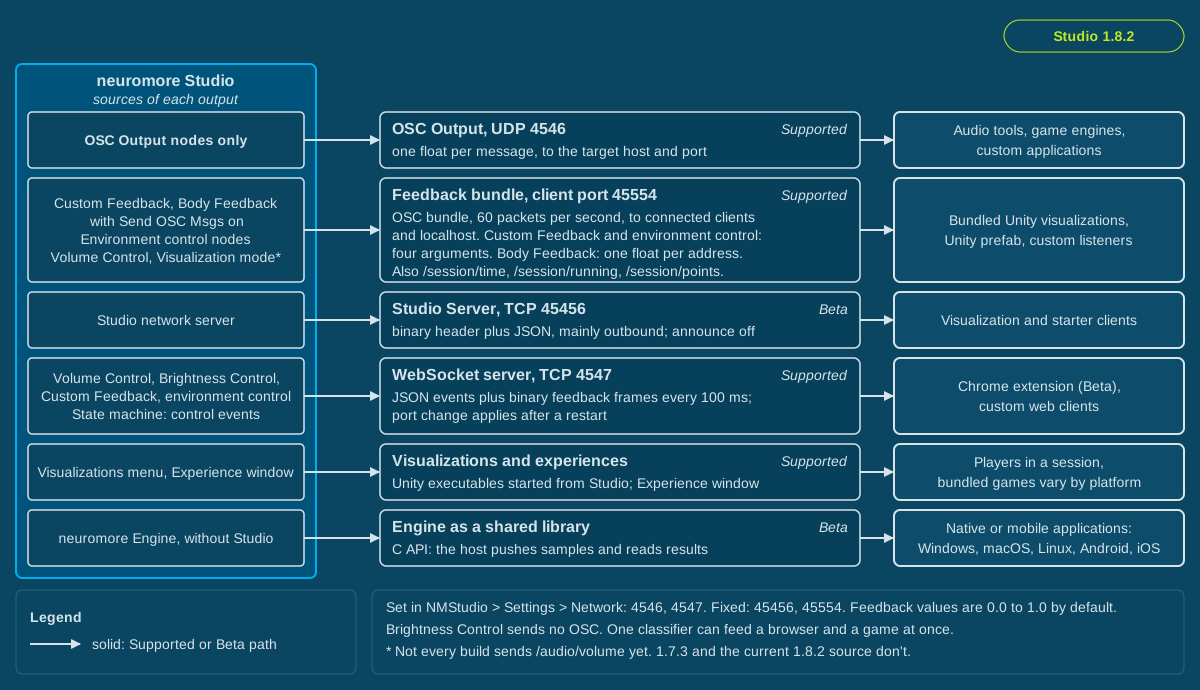
Each lane is one interface with its default port where it has one. The box at the left shows what feeds it, and the box at the right is its typical consumer. The table below has eight rows, not six: the Chrome extension is a client of the WebSocket server, and the Engine CLI is not in public builds, so neither has its own lane.
Feedback values leave Studio from a classifier node. The state machine adds control events such as Open URL and Start Browser Player over the WebSocket. One classifier can feed a browser and a game at once. For one float to the OSC target, use an OSC Output node.
Feedback values are 0.0 to 1.0 by default. A Custom Feedback node’s range is configurable, or it can be unranged. OSC Output nodes have no range. Volume Control, Brightness Control and the environment control nodes are fixed to 0 to 1. Body Feedback sends heart rate, HRV and breathing rate in their own units.
Safety: Feedback can change screen brightness and volume quickly. Avoid this setup if you are sensitive to flashing or flickering light. Keep volume moderate. Stop if you feel uncomfortable. To stop feedback, end the session with the stop button in the Session Control window (tooltip “End the Session”).
| Interface | Protocol | Default | Typical client | Status |
|---|---|---|---|---|
| OSC Output node | OSC over UDP, one float per message | 127.0.0.1 port 4546, NMStudio > Settings > Network > OSC Server | Audio tools, game engines, custom applications | Supported |
| Feedback bundle to network clients | OSC bundle over UDP, see Feedback bundle contents | Client port 45554, fixed; 60 packets per second; to each connected client and localhost | Bundled Unity visualizations, Unity prefab | Supported |
| Studio Server | TCP, 8-byte binary header plus JSON, mainly outbound | Port 45456, fixed; announce broadcast off | Visualization and starter clients; not offered as an interface for custom applications | Beta. Clients cannot request a stage switch. Switch stages from the stage table in the Session Control window. |
| WebSocket server | WebSocket, JSON events plus binary feedback frames every 100 ms | TCP 4547, NMStudio > Settings > Network > Websocket Server > Listen TCP Port | Chrome extension, custom web clients | Supported |
| Chrome extension | WebSocket client in a content script, see Chrome extension guide | ws://127.0.0.1:4547; the extension has no setting for this | Volume of audio and video elements and brightness of the page in the active tab | Beta |
| Visualizations and experiences | Unity executables started from the Visualizations menu, or the Experience window, see Experiences for Neurofeedback | Four bundled games on Windows x64 and x86; Forest Walk and Infinite Tunnel on macOS and Linux x64; none on Windows arm64 or other Linux architectures | Players in a session | Supported |
| Engine as a shared library | C API in neuromoreEngine.h, host pushes samples; JNI wrapper for Java, see Engine library and source builds | Windows, macOS, Linux, Android, iOS targets | Native or mobile applications | Beta |
| Engine CLI | NDJSON over stdin and stdout | Separate source target in 1.8.2, not in release packages | Automated integration tests | Not in public build |
Caution: The WebSocket interface is an unauthenticated local protocol. Keep its port (4547 by default) firewalled and don’t expose it to untrusted networks.
Feedback bundle contents
Section titled “Feedback bundle contents”Studio sends the feedback bundle to each connected client and to localhost on port 45554. It carries:
- Custom Feedback nodes with Send OSC Msgs on (default off), at the node’s OSC Address.
- Body Feedback nodes with Send OSC Msgs on (default off), at
/heartrate,/hrvand/breathingrate. Each of these messages has one float. - Environment control nodes, always on, at fixed addresses: Speed Control
/movement-speed, Sun Control/weather-sun, Clouds Control/weather-clouds, Fog Control/weather-fog, Rain Control/weather-rain, Vignette Control/camera/vignetting. The bundled games use addresses from this list. - Volume Control in Visualization mode, at
/audio/volume. - Session data:
/session/time,/session/running, and/session/pointswhen the session has points.
Send OSC Msgs puts a node’s value in the feedback bundle on port 45554, not on 4546. Custom Feedback and environment control messages have four arguments: value (float), is ranged (bool), range min (float), range max (float). Body Feedback messages have one float. OSC Output nodes use port 4546.
Volume Control works in Studio’s Experience window and over WebSocket to the Chrome extension. In Visualization mode, it sends
/audio/volumeto visualizations in the feedback bundle on port 45554.
Note: Not every build sends
/audio/volumeyet. 1.7.3 and the current 1.8.2 source don’t. In those builds, use a Custom Feedback node with the OSC address/audio/volumeand Send OSC Msgs on.
Brightness Control works in Studio’s Experience window and over WebSocket to the Chrome extension. It sends no OSC, deliberately, and games have no brightness address.
| Port | Protocol | Used for | Change it in |
|---|---|---|---|
| 4545 | UDP | OSC input (OSC Input nodes) | NMStudio > Settings > Network > OSC Server > Input UDP port |
| 4546 | UDP | OSC Output nodes | NMStudio > Settings > Network > OSC Server > Target UDP port |
| 45554 | UDP | Feedback bundle to clients (client side) | Fixed |
| 4547 | TCP | WebSocket server | NMStudio > Settings > Network > Websocket Server > Listen TCP Port |
| 45456 | TCP | Studio Server, client connections | Fixed; on or off with Enable TCP server |
| 45555 | UDP | Studio Server local socket | Fixed |
Target Host/IP and Target UDP port apply only to OSC Output nodes. OSC port changes apply at once. A WebSocket port change applies the next time Studio starts, and the Chrome extension stays on port 4547.
Status labels
Section titled “Status labels”- Supported: implemented in the code and intended for use.
- Beta: implemented and available, with documentation and validation still in progress.
- R&D: designed or explored, not implemented end to end.
- Planned: agreed target, not started.
- Legacy: superseded, or dependent on a component no longer shipped.
- Not in public build: not compiled into community builds. Available through a source build or a custom build, unless the entry says otherwise.
Pages in this chapter
Section titled “Pages in this chapter”- Integrations overview: this page.
- Devices: native and OSC-fed devices.
- BrainFlow boards: the 21 board IDs.
- Engine library and source builds: embedding the Engine, adding drivers.
- Browser neurofeedback: browser feedback with any device.
- Chrome extension guide: the unpacked extension.
- Browser test workflow: steps that need no hardware.
- Live feed demo: a simulator of the WebSocket feedback feed, with its message format.
- Browser constraints: browser path limits.
- BrainBit browser neurofeedback (R&D): the BrainBit project.
- BrainBit connection and setup: planned driver, interim bridge.
- BrainBit test workflow: BrainBit device and bridge steps.
- BrainBit constraints: BrainBit platforms, bridge, licensing.