
Integrations
BrainBit browser neurofeedback (R&D)
R&D. Everything on this page is for research and development exploration. Named web platforms are examples only, not confirmed integrations.
Safety: Feedback can change screen brightness and volume quickly. Avoid this setup if you are sensitive to flashing or flickering light. Keep volume moderate. Stop if you feel uncomfortable. To stop feedback, end the session with the stop button in the Session Control window (tooltip “End the Session”), or click Disconnect in the Chrome extension popup.
This page describes research and development work that applies neuromore’s generic browser path to BrainBit EEG hardware. EEG from a BrainBit device would be processed in neuromore Studio and turned into a feedback value between 0 and 1. Studio sends that value over a local WebSocket connection to the neuromore Chrome extension, which changes media volume or page brightness in the connected tab. The connected tab is the one that was active when you clicked Connect.
The browser half of this chain is not BrainBit specific. It works the same way for any device that reaches the classifier, and it is described once in Browser neurofeedback. This page covers what is particular to BrainBit: the devices, how their data is meant to reach Studio, and what is still open. The Integrations overview lists all other devices and interfaces.
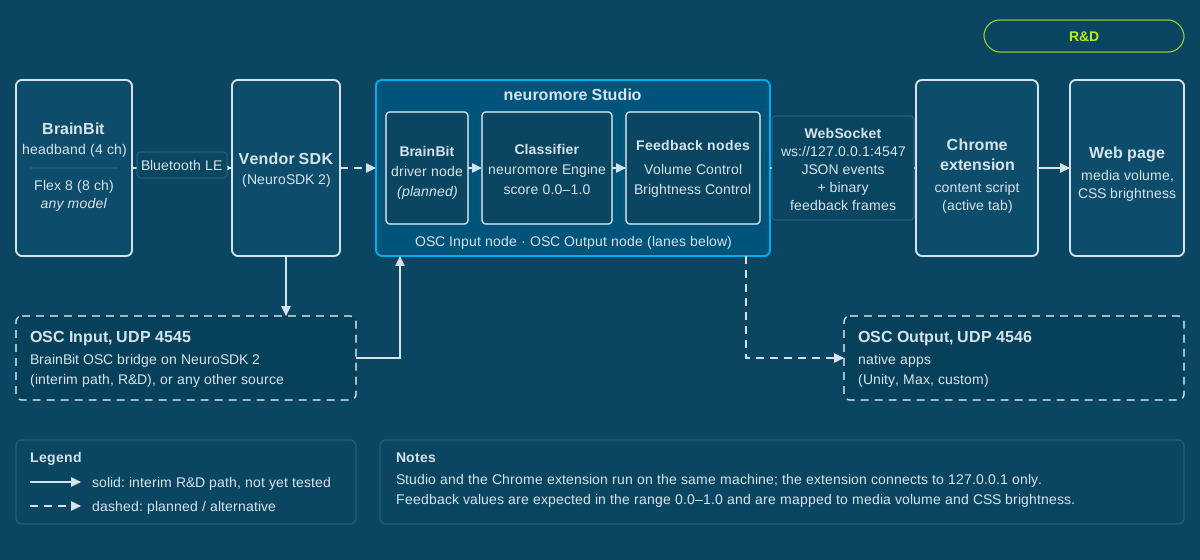
Signal path from the BrainBit electrodes through neuromore Studio to the web page, with OSC over UDP as the alternative interface for native applications.
What is specific to BrainBit
Section titled “What is specific to BrainBit”BrainBit device
Section titled “BrainBit device”The BrainBit device is the EEG source. Two models are described here: the original 4-channel headband with electrodes T3, T4, O1 and O2, and the 8-channel Flex 8. According to vendor data, both sample at 250 Hz and stream over Bluetooth LE, and the Flex 8 advertises under the BLE name “Flex Pro”. Also according to vendor data, the BrainBit 2 and the Flex 4 use the same vendor SDK.
neuromore Studio does not include a native BrainBit driver, so two paths are foreseen, neither implemented yet: the planned native driver and an interim OSC bridge. Today, live BrainBit data reaches Studio only through the legacy headband board on the BrainFlow node, see BrainFlow boards. The Flex 8 is not supported until the bridge or the driver exists. Status: R&D.
Target path: native NeuroSDK 2 driver
Section titled “Target path: native NeuroSDK 2 driver”Target architecture: a neuromore BrainBit driver built on the vendor’s NeuroSDK 2 inside neuromore Studio. Status: Planned, not implemented. The driver design covers Engine device and node classes, a Studio-side driver with its own connection thread, and the vendor libraries copied next to the Studio binary at build time. Windows x64 and macOS arm64 come first, Linux later. With the driver in place, a BrainBit device node in the classifier would expose the channels: T3, T4, O1 and O2 for the headband and eight channels for the Flex 8.
Open prerequisites include:
- Vendor SDK: Vendor SDK licensing is not yet confirmed. A native driver would ship the vendor libraries next to the Studio binary, so it depends on the answer.
- SDK version: a NeuroSDK 2 version has to be chosen.
- Account access: Studio registers a device type only for accounts allowed to use it, so the new device has to be enabled for neuromore accounts.
- Hardware: BrainBit hardware for testing.
Interim path: OSC bridge
Section titled “Interim path: OSC bridge”The design is an external bridge process built on NeuroSDK 2, for example with the vendor’s Python package pyneurosdk2. The bridge would connect to the BrainBit device and send one OSC message per channel per sample over UDP to 127.0.0.1:4545 on the same machine. Studio listens on UDP port 4545. In the classifier, one OSC Input node per channel replaces a device node. Send at a steady rate, and set each node’s Sample rate to the rate you actually send (250 for these models, according to vendor data). Status: R&D, not implemented.
The bridge design covers every BrainBit model: four OSC addresses for the headband, eight for the Flex 8. The bridge is a separate process, so its platforms follow the vendor SDK rather than Studio’s build architecture. According to vendor data, those are Windows x64, macOS universal and Linux x86_64; check the vendor’s current releases. Studio shows no impedance or battery data on this path. neuromore has no bridge yet, but any sender of this format works, so live BrainBit EEG needs a bridge of some kind and the hardware. See BrainBit connection and setup.
neuromore Engine and a future application
Section titled “neuromore Engine and a future application”neuromore Engine is the C++ processing core inside neuromore Studio. It executes the classifier, device drivers and output nodes. The paths on this page use the Engine inside Studio.
The source also has build targets for the Engine as an embeddable library on Windows, macOS, Linux, Android and iOS, see Engine library and source builds. A future application could use that library to run the same processing without the Studio user interface. The library’s API has no BrainBit device type today, so a build would first have to add one, see Engine library and source builds. The application’s own code would then read the device through the vendor SDK and push the samples to the Engine. Status: R&D, an idea with no plan yet.
Shared browser path
Section titled “Shared browser path”Everything from the classifier’s feedback node to the web page is the generic browser path. The short summaries below are enough to follow this page; Browser neurofeedback and the other linked pages hold the details. On this page, Supported means implemented for the generic path.
- neuromore Studio runs the classifier, which ends in a Volume Control or Brightness Control node with a value from 0 to 1. Status: Supported.
- WebSocket interface: Studio serves WebSocket on TCP port 4547 and sends the feedback values every 100 ms while a session runs. It needs Studio 1.7.0 or newer, according to the extension README. Status: Supported. See Browser constraints.
- neuromore Chrome extension: loaded unpacked. It connects the tab that is active when you click Connect, and applies the values to media volume or page brightness in that tab. Status: Beta. See Chrome extension guide.
- OSC over UDP: the interface for native applications, game engines and audio tools (Status: Supported), and for BrainBit the interim input (Status: R&D, not implemented). Browsers cannot open UDP sockets, which is why the browser path uses WebSocket. See OSC Tutorial and Browser constraints.
Interfaces used on this path
Section titled “Interfaces used on this path”| Name | Protocol | Default port | Role for BrainBit |
|---|---|---|---|
| OSC input | OSC over UDP | 4545 (listen) | Interim data path from the NeuroSDK 2 bridge into OSC Input nodes (R&D, not implemented) |
| WebSocket server | WebSocket over TCP | 4547 | Feedback values from Studio to the neuromore Chrome extension (generic path) |
| OSC output | OSC over UDP | 4546 (target, host 127.0.0.1) | Optional: drive a native application from the same classifier |
The full port and setting reference is in Browser constraints.
Caution: The WebSocket interface is an unauthenticated local protocol. Keep its port (4547 by default) firewalled and don’t expose it to untrusted networks.
OSC input is unauthenticated too. Keep its port (4545 by default) firewalled in the same way.
Data flow
Section titled “Data flow”This is the intended flow. Steps 1 and 2 are not implemented for BrainBit.
-
The BrainBit device samples EEG at the electrodes and, according to vendor data, streams it over Bluetooth LE to the computer running neuromore Studio.
-
The samples reach the classifier in one of two ways.
- Interim path, status R&D: an external NeuroSDK 2 bridge process receives the samples and sends them as OSC messages over UDP to Studio’s OSC input on port 4545. One OSC Input node per channel exposes them as output ports. Latency comes from the bridge and from the Engine update, which runs at 100 Hz. Studio reads incoming OSC as it arrives, with a 100 Hz poll as a fallback. Total latency is not yet measured.
- Target path, status Planned: the native neuromore BrainBit driver built on NeuroSDK 2 would receive the samples inside Studio, and a BrainBit device node would expose them to the classifier.
-
neuromore Engine, inside Studio, runs the classifier: filtering, band power or other processing, then a mapping to a feedback value between 0 and 1. This page does not prescribe channels or bands. They depend on your protocol.
In 1.7.3: The WebSocket and OSC transport is the same as in 1.8.2, but processed values are not. Filtering and band power give different numbers, so thresholds tuned on one version may need retuning. See What changed since 1.7.3.
-
From here on the chain is the generic browser path: the value reaches a Volume Control or Brightness Control node, Studio sends it over the WebSocket every 100 ms, and the neuromore Chrome extension applies it in the connected tab. The steps are described in Browser neurofeedback. The extension applies each value directly, limited only to the range 0 to 1, so smooth the value and cap the volume in the classifier. Plain
<video>and<audio>elements are the case the code is written for.
What can be tested today
Section titled “What can be tested today”The browser half needs no BrainBit hardware. It uses a synthetic signal source in Studio; see Browser test workflow. The OSC half of step 2 needs no hardware either, because any OSC sender can feed OSC Input nodes.
Live BrainBit EEG, steps 1 and 2 above, needs BrainBit hardware and either a bridge or the native driver. neuromore has no bridge yet. BrainBit test workflow lists the BrainBit steps for the OSC bridge path in order, so they can be run as soon as you have a bridge. Steps for the native driver will be added once the driver is implemented.
Licensing
Section titled “Licensing”Licensing: see neuromore Licensing, the Terms & Conditions, the End User Agreement and the Privacy Policy.
Vendor SDK licensing is not yet confirmed.
Where to go next
Section titled “Where to go next”- BrainBit connection and setup: the planned native BrainBit driver, the interim OSC bridge path for every BrainBit model, platform requirements and Studio settings.
- BrainBit test workflow: the BrainBit device and bridge steps for checking the full chain end to end.
- BrainBit constraints: BrainBit platform matrix, bridge limits, vendor SDK licensing, NeuroSDK 2 and what is planned.
- Browser neurofeedback: how browser neurofeedback works with any device that reaches the classifier.
- Chrome extension guide: installing and connecting the neuromore Chrome extension, message types and troubleshooting.
- Browser test workflow: a test of the browser path that needs no EEG hardware.
- Browser constraints: browsers, extension, WebSocket, feedback nodes, sites, update rate, ports and Studio versions.